OPD Pilot — Appointment & OPD Queue Management for Clinics
OPD Pilot runs the daily patient queue in a clinic. Patients book a slot, arrive and are checked in at the desk, the board shows who is next, and the waiting room hears the token called out. At the end of the day the whole thing comes out as a report.
It is our own software, built and supported by Amvin Digital for clinics, polyclinics and small hospitals in India. Patient messages and spoken announcements work in English, Hindi and Bengali.
The product site — full feature list, screens and specifications — is at opdpilot.com.
Three things every busy OPD runs into
None of them are about technology. They are about the queue.
The queue lives on paper
A register at the desk and a stack of slips. Whoever is standing there decides who goes in next. When they step away, the order goes with them.
“How much longer?”
There is nothing for a waiting patient to look at, so they ask the receptionist. Then they ask again. The desk spends the morning answering that question instead of checking people in.
Nothing to look back at
At closing time nobody can say for certain how many patients came, who was seen and in what order, what was collected, or who booked and never turned up.
What OPD Pilot does
From the booking to the end-of-day report.
Slot-based appointments
Set your slot length and clinic hours once. Per-doctor sitting days, leave, clinic holidays and week-offs are respected. If a date is closed or full, the booking shifts to the next working day on its own. One patient per slot — duplicate bookings are refused.
Tokens, per session
Token windows are set per session and configured per doctor, so a morning list and an evening list can number independently.
The attendance board
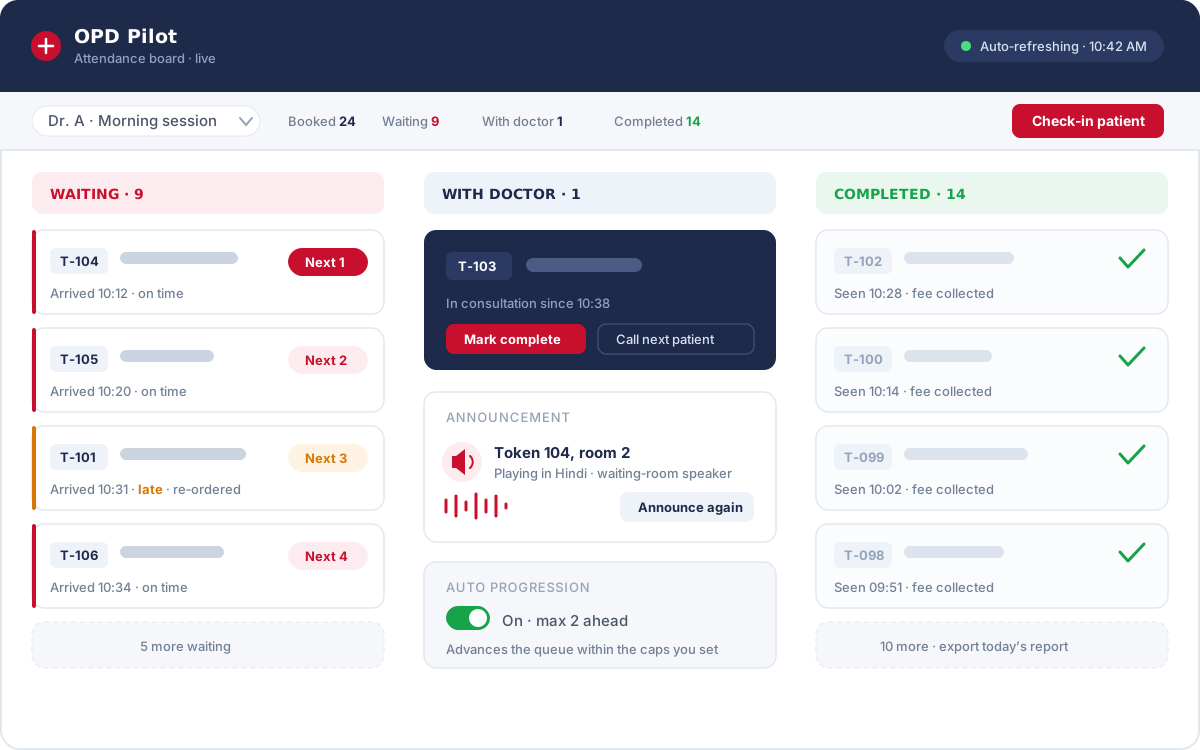
Check a patient in, drag their card between states, and the live queue is visible to everyone at once — waiting, with doctor, completed.
Smart Queue
Arrivals are classified as on time or late, and the order is recalculated by rules you set — so a patient who came at the right time is not pushed back by someone who did not.
Voice announcements
The next patient is called by token over the waiting-room speakers in English, Hindi or Bengali. Templates are set per announcement type; each device picks its own voice.
WhatsApp and email
Confirmation, reminder, same-day, reschedule, cancellation and completion messages. WhatsApp goes out through WhatsApp Web automation or the official Meta Cloud API; email goes through your clinic’s own SMTP.
Patient portal and staff app
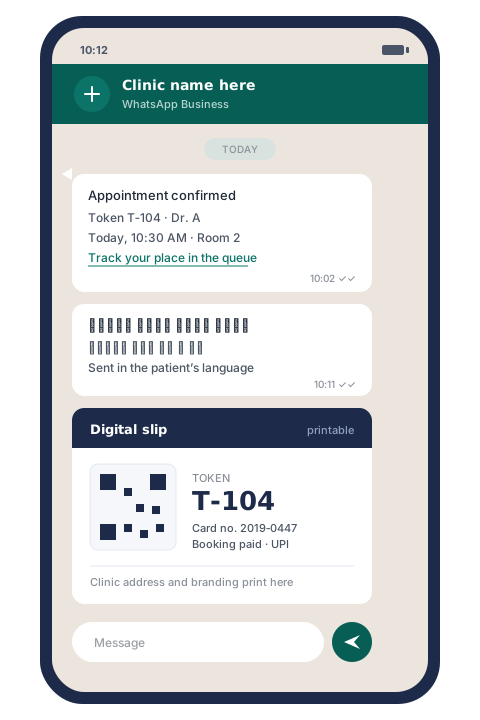
Patients book themselves with an OTP, get a tracking link, and a printable digital slip with a QR code. Staff install the mobile app on their own phones and get push notifications.
Booking amount and fees
Booking amount and consultation fee, taken in cash, by UPI or by card. You can require payment at check-in. Collection reports break down by staff member.
Reports that write themselves
Daily and periodic reports to Excel, CSV or PDF, on a schedule if you want them. Optional sync to a Google Sheet.
One patient, start to finish
The same four steps, every visit, whoever is at the desk.
The patient books
Through your reception desk, or by themselves on the patient portal with an OTP. A confirmation goes out on WhatsApp with the date, the time and the token.
They arrive and are checked in
The desk marks them arrived. If you have turned on the check-in payment gate, the booking amount is taken here. Their card appears on the board.
The queue calls them
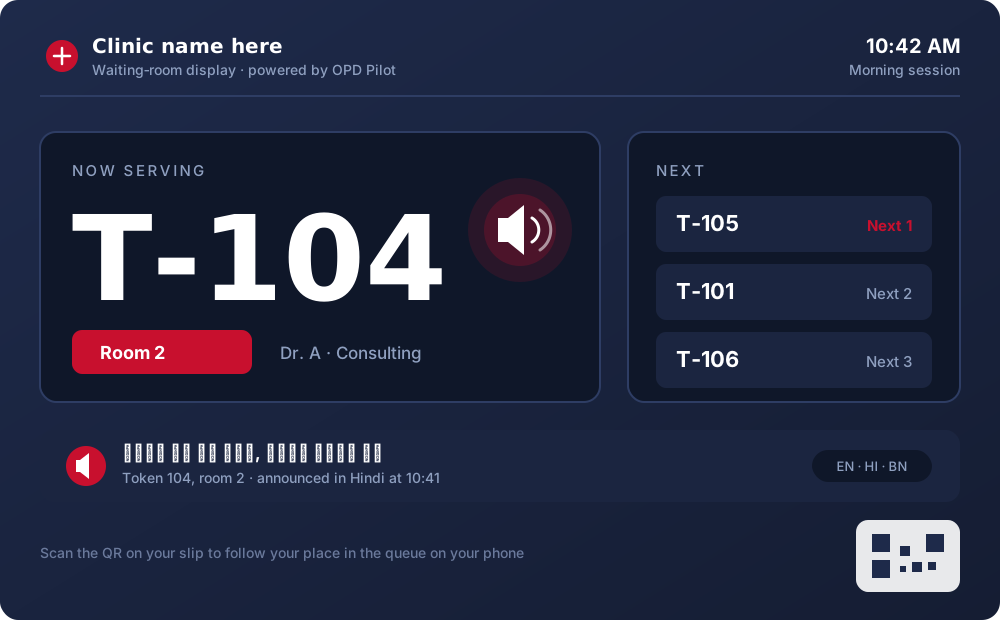
Waiting numbers move as the queue moves. When their turn comes the token is announced in the waiting room and shown on the check-in display.
The visit is recorded
The consultation is marked complete. The fee, the timings and who handled what stay on the record, and the day’s report is one export away.
The queue, in detail
This is the part a clinic actually feels. Everything else on this page exists to keep it honest.
- Three states on one board — waiting, with doctor, completed. Cards move by dragging.
- Waiting numbers show as Next 1, Next 2, Next 3, and change as the queue moves.
- Smart Queue classifies each arrival as on time or late and re-orders by rules you configure.
- Auto Progression advances the queue by itself — but only within the caps you set.
- The board polls for updates, so every screen in the clinic stays in step without anyone pressing refresh.
- A check-in display for the waiting area shows the token being served and the next few after it.
The queue is one shared thing. The front desk, the doctor’s room and the waiting-room screen are all looking at the same board, not at three people’s recollections of it.
Patients hear from the clinic without anyone remembering to call
Messages go out on their own, in the language the patient reads.
- WhatsApp, sent either through WhatsApp Web automation or through the official Meta Cloud API.
- Email through your clinic’s own SMTP, so it arrives from your address.
- Confirmation, reminder, same-day, reschedule, cancellation and completion — each with its own template.
- A patient portal for self-booking with OTP, a tracking link, and a printable digital slip with a QR code.
- English, Hindi and Bengali, for the written messages and the spoken announcements alike.
- A staff mobile app you install from the browser, with push notifications.
PMRI Homeo

PMRI Homeo is a homeopathy practice and an Amvin Digital client in healthcare. We built their patient record and appointment systems. That work — records, appointments, and the daily queue sitting behind both — is where OPD Pilot came from.
All Amvin Digital case studiesAmvin Digital completely transformed how we manage our patient records and appointment systems. With over 5 lakh patients served across four decades, we needed a digital solution that matched our scale. Their smart systems streamlined our day care services and online consultations, letting our medical team focus entirely on patient recovery.
What the owner sees at the end of the day
Without having to ask three people what happened.
The day, counted
How many were booked, how many came, who was seen and when.
Collections
What was collected, how it was paid, and by which staff member it was taken.
Exports
Excel, CSV or PDF. For today, or for any period you choose.
On a schedule
Reports arrive without anyone running them. Optional sync to a Google Sheet.
Patient records carry your card numbers, import and export as a file, and keep an edit audit trail — so a record that was changed shows what changed.
Who can do what
A clinic is not one person with one login, and OPD Pilot does not assume it is.
Five roles
Super Admin, Admin, Doctor, Receptionist and Reports Viewer — each with its own view of the system.
Permissions down to the record
Per page, per record and per status. An arrival clerk can be given exactly one power — mark patients as arrived — and nothing else.
Doctors see their own list
A doctor’s screen shows their patients, not the whole clinic’s.
Audit logs
Actions are logged. Support can impersonate a staff account to see what a user is seeing — and that is logged too.
Your branding, not ours
Clinic logo, colours and the layout of the printed slip are yours to set.
Built for OPD practices that run a daily queue
Single-doctor clinics
One doctor, one desk, and a queue that still has to be fair. Slots, tokens, announcements and reminders, without hiring anyone to run them.
Multi-doctor polyclinics
Different doctors, different sitting days, different session timings and token windows. Each doctor gets their own list; the desk sees all of them.
Small hospitals
Several OPD rooms, a front desk that works in shifts, and an owner who needs the day’s numbers without chasing them.
Before you ask us
How long does it take to set up?
Setup is configuration, not installation. Nothing is installed on your computers — OPD Pilot runs in a browser. We enter your doctors and their sitting days, leave, clinic holidays and week-offs, then your session timings, slot length and token windows, then your staff accounts and what each of them is allowed to do. Your Amvin Digital contact does this with you and stays on the line for your first live session.
Can we bring our existing patient data across?
Yes. Patient records import from a file and export the same way, and your existing card numbers come with them, so a patient who has been coming to you for years keeps the number they already know. Records also keep an edit audit trail, so any change made after the import is visible.
What happens if the internet goes down?
OPD Pilot needs a connection. The board, the announcements and the patient messages all run through it, so if the line is down the live queue is down with it. Keep a mobile hotspot at the desk as a fallback. The printed slips already carry the token numbers, so the order of the day is not lost while you switch over.
Which languages can patients be addressed in?
English, Hindi and Bengali. That covers both the spoken announcements in the waiting room and the wording of the WhatsApp and email messages. Announcement templates are set per announcement type, and the voice is chosen per device — so the reception desk and the waiting-room screen can sound different if you want them to.
What support do we get?
You reach Amvin Digital on the same channels as any of our projects. When something looks wrong on your side, our support staff can impersonate a staff account to see exactly what your team is seeing rather than asking them to describe it — and every one of those sessions is written to the audit log for you to review.
What hardware do we need to buy?
A computer or tablet at the reception desk with a web browser. For announcements, any speaker that machine can play through. For the waiting area, an ordinary screen showing the check-in display. Staff can install the mobile app on their own phones and get push notifications there. There is no special hardware to buy.
See OPD Pilot properly
The product site carries the full feature list, the screens and the specifications. If you would rather be walked through it, we will do that instead.
OPD Pilot is a product of Amvin Digital. The product site is opdpilot.com — or write to info@amvindigital.com.